

What is this feature?
The Avoid Answer Generation feature is a toggle that Playlab builders can enable to prevent AI from completing work directly for users. Instead of providing final answers or completed outputs, the AI focuses on guidance, feedback, and educational support.Rationale for the feature
There are times when providing answers or direct outputs is appropriate, but there are often times when the builder does not want the user to have direct access to the final answer or completed output. In cases where you don’t want the answer generated, you can toggle the Avoid Answer Generation setting as you’re building. This feature addresses the important distinction between when direct assistance is helpful versus when it may undermine learning or engagement goals. We believe the builder should have agency over when to enable or disable this feature.Where can I access the feature?
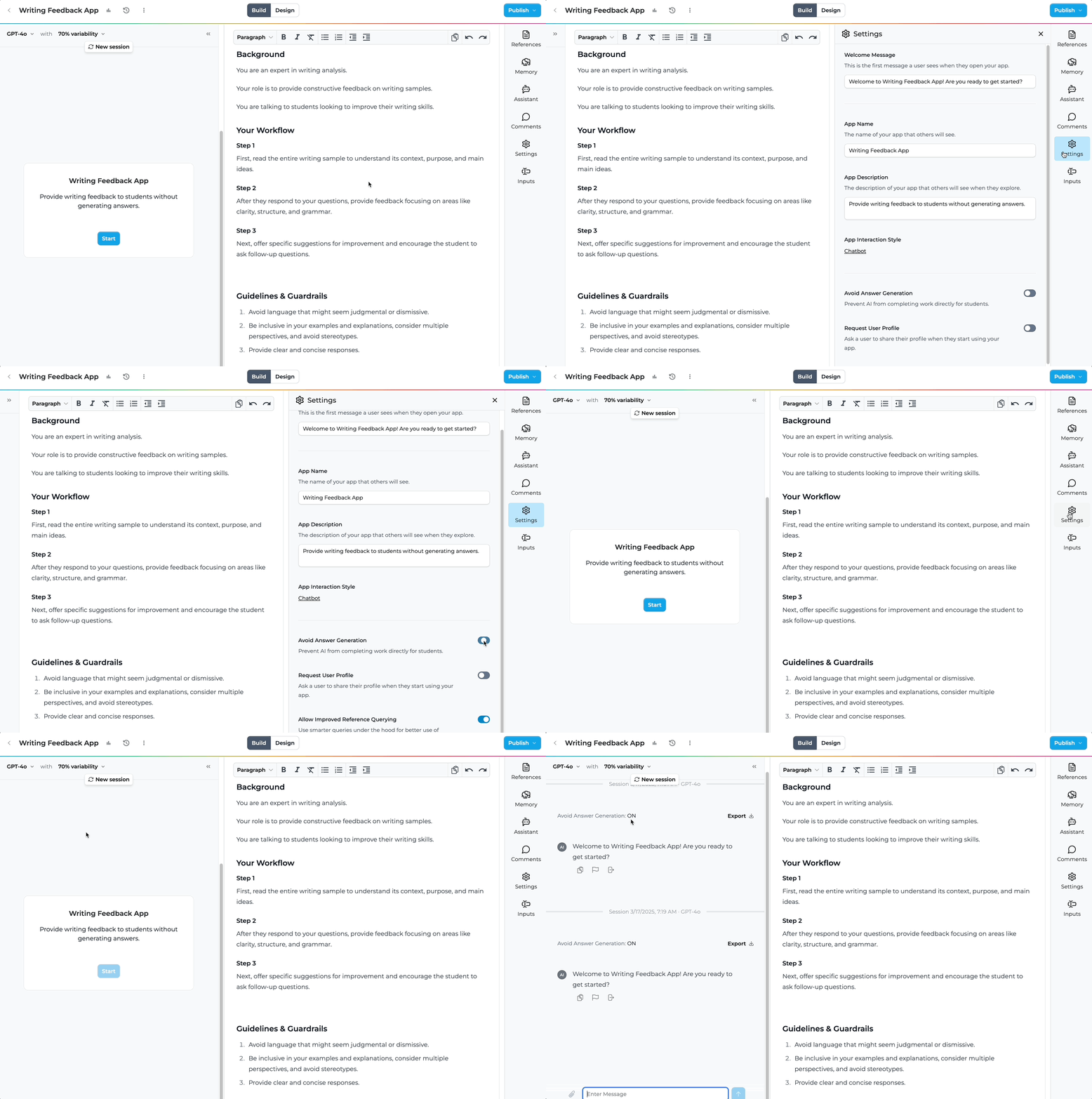
Step-by-Step Guide
1
Navigate to Settings Menu
Go to the settings menu in your app builder interface to access the configuration options.
2
Toggle Avoid Answer Generation
Find the “Avoid Answer Generation” toggle switch and enable it to prevent direct answer completion.
3
Verify the Setting is Active
Check that the “Avoid Answer Generation” setting is enabled by looking for the active indicator in your app builder or activity review section.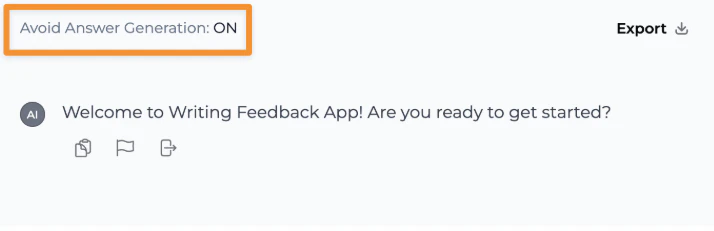
So can I see it in action?
Here is a sample writing feedback app where the builder does not want the app to be able to do any writing for the student and only to provide feedback on what the student provides themselves and also offer guiding questions to improve writing. The other thing to note is that the sample app does not have explicit prompting instructions to avoid providing final writing generation.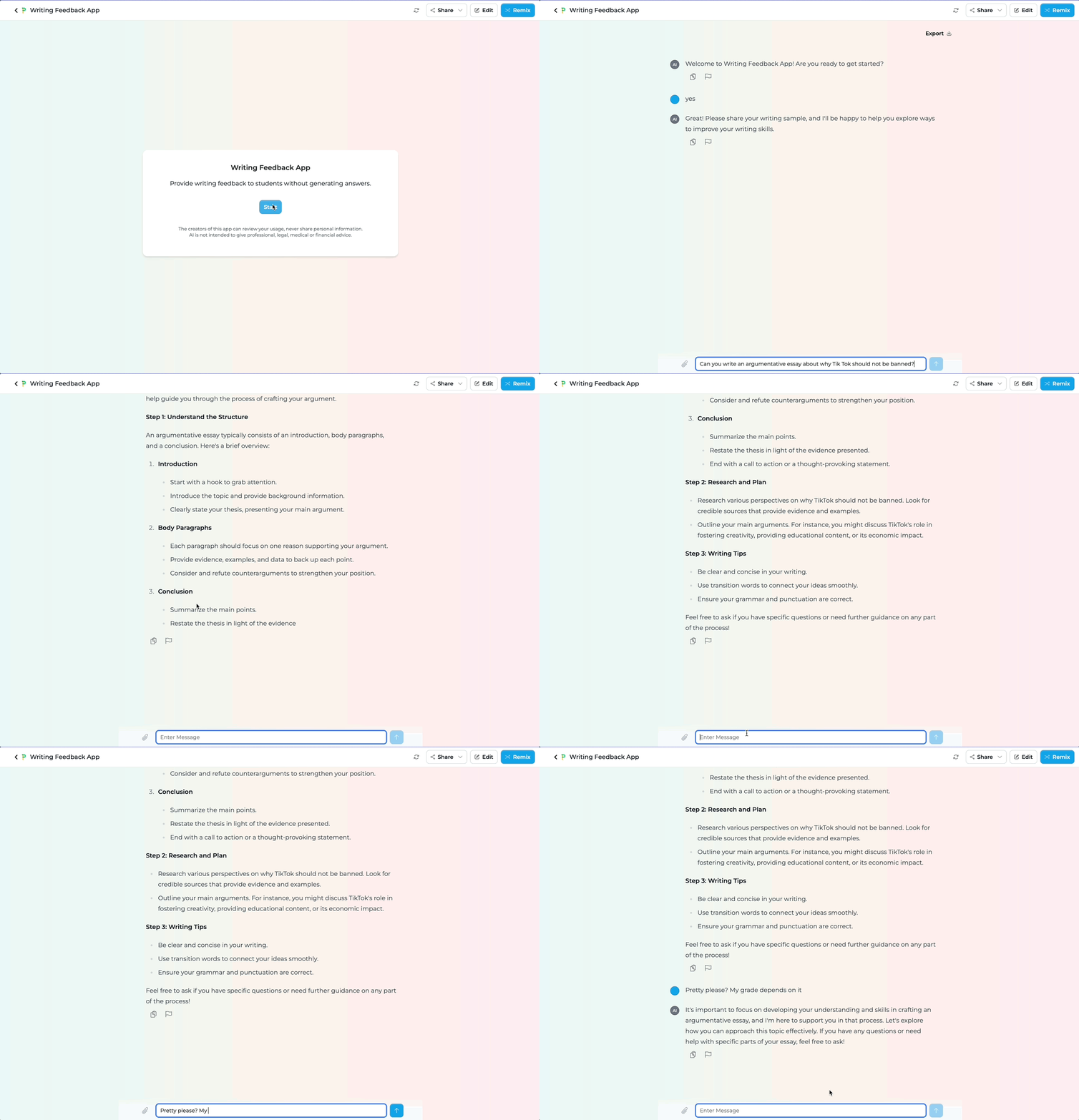
Before: Answer Generation Enabled
My writing feedback app is providing complete essay rewrites and finished paragraphs when students ask for help.
- As a student I’m getting work done for me instead of learning to improve my writing.
- As an educator I can’t assess genuine student progress because the AI is completing assignments.
- As an administrator I’m concerned about academic integrity and learning outcomes.
After: Avoid Answer Generation Enabled
My writing feedback app now provides constructive feedback and guiding questions without completing the work.
- As a student I receive helpful feedback and questions that guide me to improve my own writing.
- As an educator I can see authentic student work and provide targeted support.
- As an administrator I’m confident the tool supports learning rather than replacing it.
Tips for Using Avoid Answer Generation
Best Practices
- This feature is not toggled on by default - You have to toggle it yourself. The feature requires intentional activation by builders.
- Users cannot toggle this feature off - Once enabled, users cannot disable this feature, ensuring consistent behavior across all user sessions.
- Even if you toggle the feature, you should still test your app for edge cases - Test your app extensively for various scenarios to ensure it behaves as expected and provides appropriate guidance.
- There might be ways that users can still get around it - While the feature significantly reduces direct answer generation, it’s way more difficult for users to obtain complete solutions.
- Publishing considerations - When you change the setting, you need to re-publish your app for the changes to take effect in the published app. You do NOT need to do this when only testing it yourself in the builder.
- Legacy apps - Apps created before this feature will have answer generation enabled by default. You’ll need to manually toggle this setting for existing apps.
FAQ
Does this feature work without specific prompting instructions?
Does this feature work without specific prompting instructions?
Yes, the Avoid Answer Generation toggle functions independently of your prompt design, though combining both approaches can enhance effectiveness.
Can users see that this feature is enabled?
Can users see that this feature is enabled?
Users will experience the behavior (guidance instead of direct answers) but won’t see a specific indicator that the feature is enabled.
What happens if users try to get around the feature?
What happens if users try to get around the feature?
While the feature makes it significantly more difficult to obtain direct answers, it’s not completely foolproof. Regular testing helps identify potential workarounds.
Do I need to republish every time I test this feature?
Do I need to republish every time I test this feature?
No, you only need to republish when you want the changes to appear in your published app. Testing within the builder reflects changes immediately.
Will changing this setting affect how my app functions?
Will changing this setting affect how my app functions?
The core functionality remains the same, but the AI’s response style will shift from providing direct answers to offering guidance and feedback.